01 Overview
What Washstack is
Washstack turns a car wash's bookings, customers and cash into one dashboard. I designed it end to end, from a feature brief to a working product, for owners who have never used business software before.
The brief set out five problem areas for an MVP: user accounts, business setup, scheduling, payments and customer records, with staff management as a fast-follow. The four high-priority tracks shipped first; staff tools followed once the core loop worked. My job was to turn that list into a product an owner could hand to staff on day one.

02 The challenge
Good businesses, no system.
Bookings that get forgotten
Most operators run the day from a notebook by the till. It works until a booking slips through and a customer arrives to a wash nobody planned for.
Customers who live in someone's memory
A regular's history sits in a staff member's head or a phone's contact list, not a record the business can open.
Cash counted by hand
Takings are totalled at the end of the day, so the owner has no real view of what the business made this week.
No software habits to build on
These owners have never used business software. Anything that reads like a tool built for someone else will be abandoned.
03 Who it's for
Designing for the people on every side
The owner and their staff
A tool behind the counter for running the day: who is booked, who has paid and how the business is doing.
The customer
Book a wash from a link on WhatsApp or Instagram, on a phone, without ever having seen Washstack before.
04 Key decisions
What we learned, and what we decided because of it
Business setup is a one-time task, not something an owner returns to every day.
Seven feature areas became a six-item menu. Business setup lives inside Settings instead of standing alone.
Bookings, customers and transactions are all lists an owner needs to scan and settle.
Every list shares one shape: status tabs, a date-range filter and an export action. One pattern to learn, reused everywhere.
Staff talk about the day in plain words on the shop floor.
Booking statuses are New, Pending and Completed, the words staff already say out loud. No internal jargon made it into the UI.
Payouts fail without KYC, and owners would only find out when a withdrawal did.
On day one, the empty dashboard replaces the bookings table with a single prompt to complete KYC.
05 The solution
The product, screen by screen
Dashboard
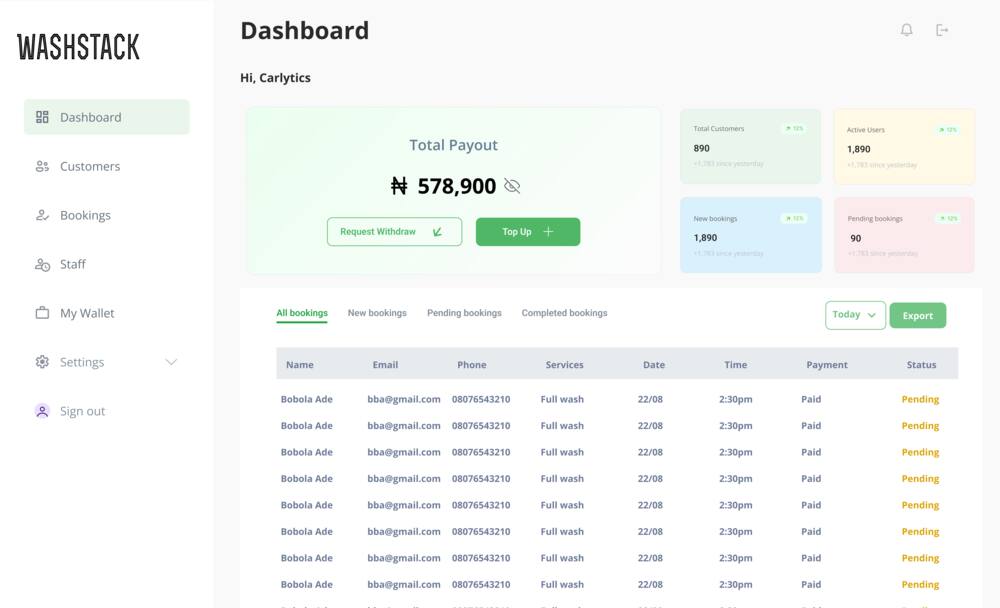
Payout total, four KPI cards and today's bookings, with a clear first step on day one.
Bookings
Online, walk-in and owner-confirmed bookings in one table with shared statuses.
Customers
A searchable record of who has been in, led by revenue, washes and commission.
My Wallet
A hidden-by-default balance, single-purpose top-up and withdrawal, and full history.
Staff
Add staff and assign cars to them as bookings come in.
Settings
Business setup and account details, out of the daily path.
Bay 01 Landing
Selling the outcome, not the feature list
An owner arriving at washstack.app has never used software to run their business. The marketing site doesn't explain what a dashboard is; it makes three promises obvious: know your profits, stop doing this by hand and keep your customers coming back.
The hero leads with a real product screenshot rather than an illustration, so the first thing a visitor sees is the wallet and bookings table they would be using.
- Decision
Pricing is two plans and a handful of bullet points, not a comparison grid. An owner comparing software for the first time needs a fast answer to 'which one is for me', not a feature matrix.

Bay 02 Sign up and sign in
Getting a first-time owner to a working account
Creating an account, logging back in and recovering a password share one system, and all three end at the dashboard, ready to work. The rule from the brief was simple: after login, an owner should never wonder whether it worked.
- Trade-off
The sign-up form asks for eight fields on one screen. Shipping one complete flow beat three half-built steps, but it's the first thing I'd test against a staged version once there's real funnel data.
Bay 03 Bookings
One booking, three ways in
The brief asked for three paths into the same table: a customer booking online, a staff member entering a walk-in and the owner confirming and tracking all of it. I treated a booking as one object with three doors, not three separate features.
- Decision
Status labels are New, Pending and Completed, the same words staff use out loud on the shop floor. 'Unconfirmed' and 'in progress' never made it into the UI.
Bay 04 Customers
Turning a walk-in into a record the business can use
The brief asked for a searchable database of who has been in. The design question was what to show first when an owner finds someone.
A customer's value to the business isn't their name or number; it's how often they come back and what they're worth. So the record opens on three numbers before a single line of history.
- Decision
Total revenue, washes and commission sit at the top of the record in the same treatment as the dashboard's KPI cards, so an owner reads a customer the way they read the business.
Bay 05 Wallet
Handling money the way the counter already does
The wallet is the part of Washstack closest to a bank app, and the part an owner will trust least at first. Every decision here borrows from habits they already have with cash.
- Decision
The balance is hidden by default. A cash box isn't left open on the counter for anyone walking past, and the wallet shouldn't be either, especially on a shared shop screen.
- Decision
Top-up and withdrawal are two short, single-purpose panels rather than one 'manage funds' screen, which keeps the transaction history simple to reason about afterwards.
Bay 06 Dashboard
Designing the first day, not just the busy day
Every dashboard demo shows the filled state. The harder design problem is the empty one: what does an owner see on day one, before there's any data to be proud of?
- Decision
The empty state is an onboarding nudge, not a blank. Complete KYC replaces the bookings table until it's done; buried in Settings, an owner would discover it only when a withdrawal failed.
06 Reflection
What I'd revisit next.
A case study is more honest with its edges included. These are the three things I'd push on with more time and real usage data.
The sign-up form is long
Eight fields on one screen gets an owner to a working account fast. It's the first place I'd test a staged version once funnel data justifies the engineering.
Patchy connectivity
Car washes are outdoor, often low-signal sites. Confirming bookings and moving money are the flows I'd stress-test hardest for slow networks and offline retries.
Staff permissions, not just staff records
Owners can add staff and assign cars, but can't yet limit what staff see in the wallet. That's the natural next scope once the core loop is trusted.