01 Overview
What Nanomixr is
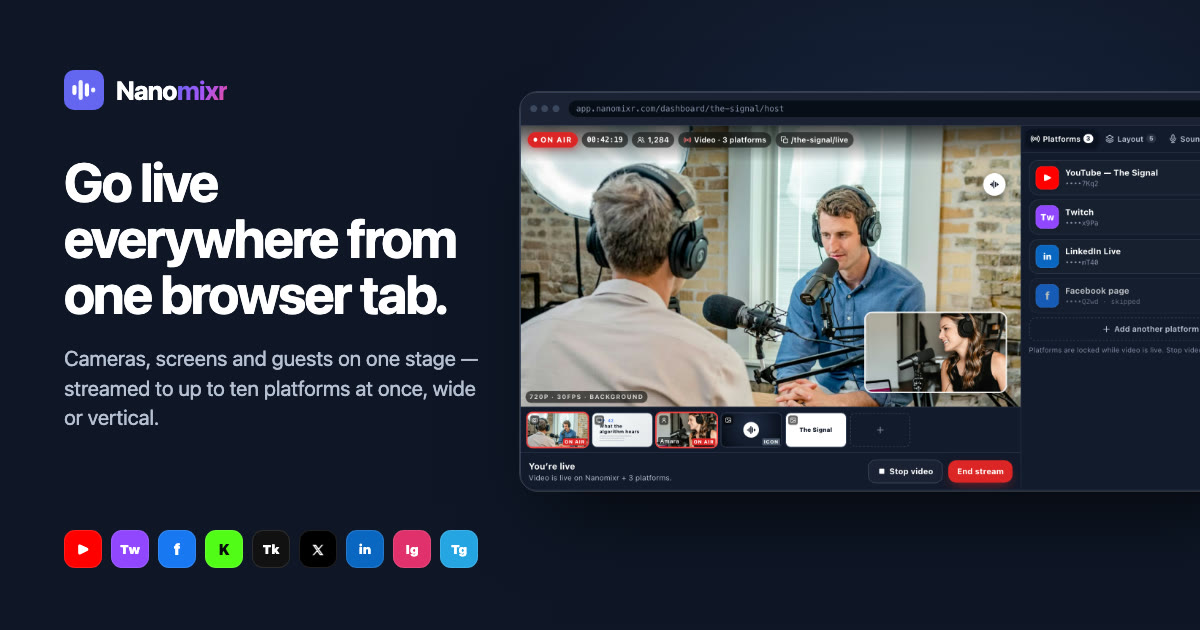
Nanomixr is a live production studio that runs in a browser tab. Podcasters, creators and media teams bring cameras, screen shares and guests onto one stage, then stream to YouTube, Twitch, TikTok, Instagram, LinkedIn and any RTMP server at the same time.
When the stream ends, the work doesn't start again. The recording flows into an audio studio that edits, publishes to podcast apps and tracks per-episode listening.
02 The challenge
Live production shouldn't need a control room.
Too many tools
Encoder software, a restreaming service, a guest call app and a podcast editor, all glued together minutes before going live.
Every platform wants a different shape
YouTube wants wide, TikTok wants vertical, and the creator wants to make one show.
Guests are the riskiest part
Untested mics and shaky connections turn into on-air problems with an audience watching.
The show ends, the work begins
Turning a live recording into an episode is a separate job in a separate tool.
03 Who it's for
Designing for the people on every side
Podcasters
Go live, then publish the episode without re-recording or re-exporting.
Creators
Be on every platform at once from a single setup.
Media teams
Roles, invites and many shows under one account.
04 Key decisions
What we learned, and what we decided because of it
During a live show, the program picture is the only thing that matters.
The console gives the program picture the stage, with a source strip beneath and a single rail for platforms, sound, chat and audience.
Live is stressful. The time to fix problems is before anyone is watching.
A pre-show check grades device and connection, and quality adjusts on air without dropping a platform.
Guests need a private rehearsal space.
Listeners request to speak, test their mic privately and are brought on stage only when ready.
Creators make one show, not ten.
One set-up, many outputs: each destination is wide (16:9) or vertical (9:16), and platforms are locked while live.
Starting should take seconds, not settings.
A three-step set-up (Identity, Audience, Launch) where the show name becomes its public link and audience code.
05 The solution
The product, screen by screen
Broadcast console
A live switcher for cameras, screens, images and clips at 720p or 1080p.
Simulcast
Up to ten destinations: nine built in plus any RTMP server.
Layouts
Switch, Side, Grid, Spotlight, picture-in-picture or a custom layout.
Sound
A live mixer with sound checks, a program meter, music beds and extra mics.
Watch page
No account, no app, under a second behind live, with a 30-minute rewind.
Audio studio
Edit the show into an episode, publish to podcast apps and track listening.
Interface studies drawn with sample data.
06 Reflection
Calm controls for a live moment.
Live software is judged in its worst minute: a guest's mic fails, a platform drops, the host is mid-sentence. The interface has to be quietest exactly when everything else is loudest.
Most of Nanomixr's design is about moving decisions earlier, into set-up and the pre-show check, so that on air, the host only has to think about the show.